Think of your family photos like a favorite book. The printed pictures in your albums are like paperbacks—well-loved and accessible, but ultimately just copies. The 35mm negatives, however, are the author's original manuscript. They are the master copy, holding all the detail, richness, and color information exactly as the camera captured it. Because of this, they almost always offer a much higher resolution than the prints made from them. Preserving these originals with a professional photo transfer is the key to getting the best possible version of your memories. This guide will walk you through why these negatives are so important and the best ways to protect them.
Key Takeaways
- Your Negatives Are the Master Copy: Your 35mm negatives hold significantly more detail and richer color than their corresponding prints. For the best possible digital image, always work from the original negative, not a faded photo.
- Recognize the Signs of Decay: Film isn't permanent and will break down over time, especially in typical home storage. A distinct vinegar smell, brittleness, or curling are urgent signs that your negatives are deteriorating and need to be digitized soon.
- Digitize for Permanent Protection: While proper storage helps, creating a digital copy is the only way to truly protect your photos from physical damage and decay. Digitizing makes your memories easy to share and safeguards them for future generations.
What is a 35mm Negative?
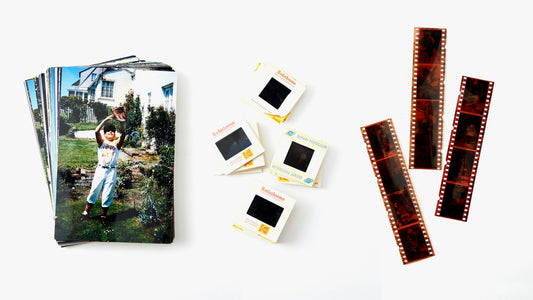
If you have boxes of old family photos, you’ve likely come across strips of brownish-orange film. These are 35mm negatives, and they are the original source of your printed photographs. Before digital cameras became a household staple, photographers relied on this film to capture everything from birthday parties to weddings. Each negative holds a high-quality version of your memory, often with more detail and color information than the corresponding paper print. Understanding what these little strips are is the first step in preserving the precious moments they contain.
Understanding its Structure and Format
When you look at a 35mm negative, you're actually looking at what is technically called "135 film." The name "35mm" refers to the width of the film strip from edge to edge. Each individual image on that strip measures 36mm by 24mm, a size that photographers refer to as "full frame." This generous size is one reason these negatives can produce such detailed images. A standard roll of 35mm film typically held either 24 or 36 pictures, which is why you often find them stored in sleeves with rows of images. The perforations, or sprocket holes, along the edges were used to guide the film through the camera.
How 35mm Film Captures an Image
The magic of a 35mm negative lies in its chemistry. The film is coated with light-sensitive silver halide crystals. When you snap a picture, light enters the camera and exposes the film, causing a chemical reaction that creates a latent, or invisible, image. During development, this becomes a visible "negative," where light areas appear dark and dark areas appear light. Because the negative is the direct result of this process, it holds a much higher resolution than a printed photo. That’s why a professional photo transfer service will always yield better results when scanning from the original negative rather than a faded print.
The Story Behind "135 Film"
The 35mm format has a rich history that starts with motion pictures. The film used for movies was 35mm wide, and in 1934, Kodak ingeniously adapted it for still photography, introducing it as "135 film" to distinguish it from its cinematic counterpart. It was a game-changer. By the late 1960s, it had become the most popular film type for consumers around the world, making photography more accessible than ever. While many of us have moved on to digital cameras, 35mm film is still cherished by enthusiasts for its unique look and is even available for purchase today, a testament to its enduring legacy.
A Brief History of 35mm Negatives
Have you ever wondered how those little strips of film in your attic became the go-to for capturing family memories? The story of the 35mm negative is a fascinating one, and it explains why so many of our most cherished moments from the 20th century live on this specific format. It’s a journey from a niche product to the undisputed king of photography, and it all started with a simple, brilliant idea.
Kodak's Debut in 1934
It all started back in 1934 when Kodak introduced the 35mm film format. This was a huge deal because it made photography so much more accessible. Before this, cameras were often bulky and complicated. Kodak’s innovation paved the way for smaller, more user-friendly cameras that anyone could use, not just professional photographers. Suddenly, capturing everyday moments became easier and more affordable. This pivotal change, part of the larger history of Kodak, set the stage for decades of family photos, vacation snapshots, and candid memories.
Becoming the Photography Standard
Fast forward to the late 1960s, and 35mm film was everywhere. It had officially become the most popular film type for photographers of all skill levels. You might also hear it called '135 film,' which is just its technical name. Its popularity exploded because it hit the sweet spot of convenience and quality, making it the standard for everything from professional shoots to your dad’s camera on family holidays. This versatility meant it worked in a huge range of cameras, cementing its place as the go-to choice for capturing life's moments for generations. It's likely the format holding many of your own family's memories, just waiting for a modern photo transfer.
How Do 35mm Negatives Compare to Digital Photos?
When you can take a dozen photos in a second on your phone, it’s easy to forget the unique magic of film. But how do those old 35mm negatives tucked away in your closet actually stack up against the digital photos we take every day? While both formats capture memories, they do so in fundamentally different ways. Understanding these differences highlights why your film negatives are so special and worth preserving. From resolution to color and that unmistakable film "look," each format has its own strengths. Let's explore how they compare and what makes your negatives irreplaceable.
Film vs. Digital: Quality and Resolution
Think of a 35mm negative as the master copy of your photograph. It’s the original source, and because of this, it often holds a higher level of detail and quality than a physical print made from it. The fine grain of the film emulsion can capture an incredible amount of information. When professionally scanned, a single 35mm negative can produce a high-resolution digital image that rivals photos from modern digital cameras. The key is in the conversion process. A high-quality scan is essential to pull out all that rich detail, turning your tiny negative into a stunning digital file you can easily share and enlarge. This is why a professional photo transfer can make all the difference.
Dynamic Range and Color Differences
One of film’s most celebrated qualities is its dynamic range—its ability to capture details in both the brightest highlights and the darkest shadows of a scene without losing information. This often gives film photos a more natural and forgiving look. However, the color on film negatives isn't permanent. Over time, the chemical dyes in color negatives break down, especially the cyan (blue) layer. This is why older color photos can develop a distinct reddish or magenta tint. Black and white negatives, on the other hand, are much more stable and can last for generations if stored properly. This color shift is a compelling reason to digitize your memories before they fade further, preserving their original vibrancy with a film transfer.
The Unique Aesthetic of Film
Beyond the technical specs, film has an emotional quality that’s hard to replicate. The subtle grain, the rich textures, and the distinct color palettes create a timeless and authentic feel. This unique aesthetic is a major reason why so many people are rediscovering film photography. Each roll of film has its own personality, lending a sense of warmth and nostalgia to the images it produces. Digital photos are crisp and clean, but film photos feel tangible and alive. By preserving your negatives, you’re not just saving an image; you’re holding onto that authentic analog character that makes the memory feel so special and real.
Why Do 35mm Negatives Deteriorate?
You might think of your 35mm negatives as tiny, timeless capsules of your family’s history, but the physical film is far from permanent. Negatives are made of a plastic base coated with a chemical emulsion that naturally breaks down over time in a process called "vinegar syndrome." This deterioration is inevitable and is accelerated by the environment where they're stored. Things like heat, humidity, and light exposure all play a significant role in how quickly your precious memories start to fade, curl, or become brittle. The good news is that understanding what causes this decay is the first step toward saving your images before it's too late.
Environmental Factors
The single biggest threat to your 35mm negatives is the environment they live in. While film manufacturers like Kodak have stated that negatives can last for centuries, that's only under perfect, museum-grade conditions—think cold storage with precisely controlled humidity. For the rest of us, storing negatives in an attic, basement, or closet means a much shorter lifespan. In a typical home environment, negatives can begin to show serious signs of decay in as little as 20 to 50 years. High humidity can cause the emulsion to become sticky, while heat speeds up the chemical breakdown, leading to discoloration and fading. A professional photo transfer can rescue them from these damaging conditions.
The Chemical Breakdown Process
The deterioration of film negatives happens in predictable stages. It’s a slow chemical reaction that releases acetic acid, which is what gives decaying film that distinct vinegar-like smell. As this process unfolds, it can even spread to other negatives stored nearby.
Here are the five stages of decay to look for:
- The film starts to turn an amber color, and the image begins to fade.
- The negative becomes brittle and may feel slightly sticky to the touch.
- It gets very brittle, bubbles may appear, and the vinegar smell becomes noticeable.
- The film becomes soft and extremely sticky again, with a much stronger smell.
- Finally, it degrades into a brown, acidic powder, and the image is lost forever.
Common Signs of Damage
Catching deterioration early is key to saving your images. The most obvious sign is that sharp, vinegary smell. If you open a box of negatives and get a whiff of vinegar, it’s a clear warning that the chemical breakdown has begun. This acid can be an irritant to your eyes and skin, so it's best to handle decaying film with care. Visually, look for negatives that are curling at the edges, feel brittle, or have a sticky texture. Once negatives reach the third stage of decay, they are often too fragile to be handled or scanned by most equipment. This is why it's so important to digitize them with a professional film transfer service before the damage becomes irreversible.
How to Properly Store Your 35mm Negatives
Your 35mm negatives are the original blueprints of your memories. Unlike a printed photo, which is a copy, the negative holds all the detail and color information captured by the camera. If it gets damaged, that original quality is lost forever. That’s why storing them correctly is so important. It’s not just about putting them in a box; it’s about creating a safe environment where they can resist the effects of time.
Proper storage can dramatically extend the life of your film, but the ultimate way to protect these moments is to create a digital backup. By digitizing your photos, you create a perfect copy that won’t fade, scratch, or decay. Think of it as the best insurance policy for your family’s history. Once they’re digitized, you can share them easily and know the originals are safely preserved. Let’s walk through the best practices for keeping your physical negatives in top condition.
Control Temperature and Humidity
The biggest enemies of film negatives are heat and moisture. These two factors can speed up the chemical breakdown of the film, leading to color shifts, fading, and brittleness. While negatives can theoretically last for centuries under perfect museum conditions (around 30-32°F with 40% humidity), that’s not realistic for most of us. In a typical home environment, negatives may only last 20 to 50 years before showing signs of decay. To give your negatives the best chance, store them in a cool, dark, and dry place with stable conditions. A closet in the main living area of your home is a much better choice than a damp basement or a hot attic, where temperature and humidity fluctuate wildly.
Use Archival-Quality Storage
The materials your negatives touch matter just as much as the air around them. Standard paper envelopes, cardboard boxes, and plastic sleeves can contain acids and chemicals that will damage your film over time. You’ll want to invest in archival-quality storage materials, which are specifically designed to be chemically stable and safe for long-term preservation. Look for sleeves made from polyethylene, polypropylene, or polyester, and store them in acid-free boxes. This prevents scratches, keeps dust away, and protects the film from harmful chemical reactions. Remember, your negatives are irreplaceable originals, so giving them a safe home is a crucial step in preserving those memories.
Practice Safe Handling
Every time you handle your negatives, you risk leaving fingerprints, oils, and scratches on the delicate emulsion. The best way to avoid this is to wear soft, lint-free cotton gloves whenever you touch them. If you don’t have gloves, be sure to hold the negatives carefully by their edges. It’s also a good idea to inspect your collection periodically. Look for any signs of deterioration, like a vinegar-like smell (a sign of acetate decay), stickiness, or discoloration. If you find negatives that are starting to decay, it’s important to separate them from your healthy film to prevent the damage from spreading to the rest of your collection.
What's the Best Way to Digitize 35mm Negatives?
So, you've safely stored your negatives, and now you're ready to bring those memories into the digital world. The good news is you have options! The best path for you really depends on how much time you have, your budget, and the quality you're aiming for. Deciding how to digitize your 35mm negatives is a big step, and the right choice ensures your photos look their best for years to come.
There are two main routes you can take: doing it yourself (DIY) or using a professional service. The DIY approach can be incredibly rewarding and gives you complete control over the final image. You can use a dedicated film scanner or even a DSLR camera to capture the images. This path is perfect for hobbyists or anyone who enjoys the technical side of photography and wants to personally handle their family archives. However, it does require an investment in equipment and, more importantly, your time. Getting the lighting, focus, and color balance just right can be a learning curve.
On the other hand, a professional digitizing service takes all the guesswork out of the process. This is the ideal choice if you have a large collection of negatives, lack the technical equipment, or simply want the assurance of high-quality results without the hassle. Experts use commercial-grade scanners and software to capture the best possible image from your film, often correcting for color fading and dust. While it involves a cost, you're paying for expertise, convenience, and peace of mind, knowing your irreplaceable memories are in good hands. We'll explore these options in more detail so you can find the perfect fit for your project.
DIY Scanning with a DSLR
If you're comfortable with a camera, this method can be a fun and efficient project. Instead of a traditional scanner, you use your DSLR to take a high-resolution photo of your negative. You’ll need a simple setup: a macro lens for sharp focus, a tripod to keep your camera steady, and a light source (like a lightbox or tablet) to evenly illuminate the negative from behind. After capturing the image, you use editing software like Adobe Lightroom or Photoshop to invert the colors and make adjustments. This process essentially lets you "develop" the photo on your computer. Many photographers find that using a DSLR is faster than a flatbed scanner and offers complete creative control over the final look.
Using a Professional Digitizing Service
If the idea of setting up a mini photo studio sounds like more work than you want to take on, a professional service is your best friend. This is the most straightforward way to get high-quality results without investing in special equipment or spending hours learning editing software. Companies like YesVideo are built for this. You simply send in your negatives in a pre-paid, crush-proof box, and trained technicians handle the entire process by hand. Using a professional service ensures your memories are treated with care and scanned with top-of-the-line equipment. It’s an excellent choice for peace of mind and beautiful, vibrant digital copies of your family’s history. Our photo transfer service is designed to make this process simple and safe.
Choosing the Right Scanner and Settings
For those who want to do it themselves but prefer a more contained setup, a dedicated film scanner is a great option. But not all scanners are created equal. Remember, your tiny 35mm negatives hold a ton of detail—often much more than the original 4x6 prints. To capture all that fine detail, you need a scanner with a high optical resolution, measured in DPI (dots per inch). While a basic flatbed scanner might work for prints, it won't do justice to your negatives. You’re working with the original source material, which almost always has a higher image quality. For the best results, look for a scanner designed specifically for film and be prepared to scan at a high resolution to get a sharp, clear digital file.
How to Clean and Restore Damaged Negatives
Finding a roll of negatives only to see they're covered in dust, fingerprints, or scratches can feel like a gut punch. These tiny frames hold irreplaceable moments, and seeing them damaged is tough. But don't lose hope. With a gentle touch and the right tools, you can often clean and restore them, bringing those memories back to life. Whether you decide to handle it yourself or pass it to an expert, you have options for repairing the damage.
Safe Cleaning Methods
Before you do anything, remember that your negatives are the original copies of your photos. They are incredibly delicate, and once they’re gone, those images are gone forever. The golden rule here is to be as gentle as possible. Start with the least invasive method by using a can of compressed air to blow away any loose dust and debris. Hold the can upright and spray in short bursts from a safe distance to avoid causing damage. For fingerprints or stubborn grime, you can use a soft, anti-static microfiber cloth. Lightly wipe the surface in a straight line from the center to the edge. Never rub in circles, as this can create tiny scratches.
Digital Restoration Options
Once your negatives are clean, the real magic happens after you digitize them. Scanning your negatives creates a high-resolution digital file that you can edit without ever touching the original again. Using photo editing software, you can correct a surprising amount of damage. For photos with faded or shifted colors, you can adjust the tone levels for each color channel—red, green, and blue—to restore the original vibrancy. Digital tools also make it easy to remove remaining dust spots, fix scratches, and even repair small tears. Once restored, your digital photos are ready to be backed up and shared with family and friends for years to come.
When to Call a Professional
While DIY cleaning and restoration can work for minor issues, it can also be risky and time-consuming. If your negatives are very old, brittle, or have significant damage like mold or deep scratches, it’s best to call in a professional. Experts have specialized equipment and archival-safe cleaning solutions to treat fragile film without causing further harm. Professional services ensure you get sharp, vibrant digital copies that capture the original image’s beauty. Entrusting your memories to a service like YesVideo’s photo transfer means your negatives will be handled by trained technicians who manage the entire process, giving you peace of mind and beautiful results.
Why You Should Preserve Your 35mm Negatives Today
Tucked away in shoeboxes and old photo albums, those little strips of 35mm negatives are more than just film—they're the original blueprints of your family's most cherished moments. While it’s easy to forget about them, these negatives are the key to keeping your memories vibrant and safe. Over time, they can fade, scratch, or break down, and once they’re gone, the moments they hold are lost forever.
Digitizing your negatives is one of the best things you can do to protect your family’s legacy. It’s not just about creating a backup; it’s about breathing new life into old photos, preserving their original quality, and making them easy to share with everyone you love, no matter where they are. Let’s walk through exactly why now is the perfect time to give your negatives the attention they deserve.
Protect Irreplaceable Family Memories
Think of your 35mm negatives as the master copies of your memories. Unlike a printed photo, which is a copy, the negative is the original source. The problem is that, just like old photos, negatives won't last forever and will eventually deteriorate. If they are damaged by heat, humidity, or simply the passage of time, those memories are gone for good because there's no other backup.
By choosing to transfer your photos and negatives into a digital format, you’re creating a permanent, protected version of these irreplaceable moments. It’s a way to safeguard your family’s history from physical decay, ensuring that a flooded basement or a hot attic doesn’t erase your past.
Create Digital Backups for Future Generations
One of the best parts of digitizing your negatives is how simple it makes sharing your memories. Instead of passing around a delicate strip of film, you can send a high-quality digital file to family members across the country with just a click. Scanning your negatives helps make sure your memories are saved for your children and grandchildren to enjoy.
Imagine your kids being able to see clear photos of their grandparents' wedding or your own childhood vacations. Creating a digital media transfer builds a family archive that can be easily copied, stored in the cloud, and passed down through generations without ever losing quality. It turns a box of forgotten film into a living library of your family’s story.
Maintain the Original Image Quality
If you want the best possible version of your old photos, always go back to the negative. 35mm negatives almost always have a better picture quality and higher resolution than the printed photos made from them. The film itself is capable of capturing an incredible amount of detail, which often gets lost when printed on photo paper, especially with older printing technology.
When you scan a negative, you capture all of that original detail, color, and dynamic range. This means your digital images will be sharper, clearer, and more vibrant than what you’d get from scanning a faded, discolored print. Using a professional film transfer service ensures you’re preserving the highest quality version of your memories.
Related Articles
- 5 Ways to Convert Negatives to Digital – YesVideo
- Negative Photos 101: A Comprehensive Guide – YesVideo
- How to Scan 35mm Negatives: Step-by-Step Guide – YesVideo
Frequently Asked Questions
Why should I scan my negatives instead of just the printed photos? Think of your 35mm negative as the original master recording of your memory. It holds far more detail, color information, and sharpness than the printed 4x6 photo, which is essentially a copy. When you scan the negative, you are capturing the image from its highest-quality source, resulting in a digital file that is clearer, more vibrant, and can be enlarged without losing quality.
Is it too late to save my negatives if they already smell like vinegar or are curled? Not at all! That distinct vinegar smell is actually an early warning sign that the chemical breakdown process has begun. While it does mean the film is deteriorating, it’s also the perfect signal to act now. Digitizing them at this stage can preserve the image before the film becomes too brittle or sticky to be handled safely, effectively stopping the decay in its tracks by creating a permanent digital version.
What's the main difference between how color and black and white negatives age? The key difference lies in their chemistry. Black and white negatives create images using stable metallic silver particles, which can last for a very long time if stored properly. Color negatives, however, rely on less stable organic dyes. Over time, these dyes fade at different rates—the cyan (blue) dye is often the first to go—which is why older color photos can develop a reddish tint.
I'm worried about sending my only set of negatives away. How do I know they'll be safe? This is a completely valid concern, as your negatives are truly irreplaceable. A professional and trustworthy service understands this and will have a secure process in place. This typically includes a crush-proof shipping box with tracking, and once your order arrives, trained technicians handle every single negative by hand in a secure facility, ensuring your memories are treated with the utmost care from start to finish.
Why do so many of my old color photos have a reddish tint? That reddish or magenta hue you see in older color photos is a classic sign of aging film. It happens because the cyan dye layer in the negative is the least stable and fades faster than the magenta and yellow dye layers. As the blue tones disappear over the decades, the remaining red and yellow tones become more prominent, shifting the photo’s overall color balance.